7 Steps to Build a Portfolio That Actually Stands Out
The Portfolio Fantasy vs. Reality
Imagine this:
You wake up tomorrow and check your email. There’s a message from a studio you admire—one you applied to weeks ago, half-expecting the usual silence. But this time is different.
“We reviewed your portfolio and were impressed by your work. We’d love to schedule a call to discuss opportunities on our team.”
Your heart races. Not from surprise that someone responded—but from the quiet confidence that you knew this was coming. Because you built something that stands out. Something that communicates exactly who you are and what you bring. Something that makes hiring managers stop scrolling and start reading.
This isn’t fantasy. This is the reality for designers who approach their portfolios strategically.
We’ve reviewed hundreds of portfolios through our Game Careerz work. The difference between those that generate interviews and those that disappear into the void isn’t talent alone. It’s presentation. It’s clarity. It’s making it effortless for busy reviewers to understand your value.
These 7 steps will get you there.
Step 1: Make Your Focus Obvious
The first three seconds determine whether a reviewer keeps looking or moves on.
In those three seconds, they need to understand exactly what you do. Not vaguely. Not eventually. Immediately.
The Clarity Test
Can someone glance at your portfolio and instantly answer:
- What role are you pursuing? Game designer? Level designer? Systems designer? Narrative designer?
- What type of games? Single-player or multiplayer? Mobile or console? Competitive or casual?
- What’s your experience level? Student? Entry-level? Mid-career transition?
- What’s your background? Indie work? AAA experience? Adjacent industry skills?
- Are you a single-player designer or a multiplayer designer? Do you mostly do indie work or have experience at a AAA game studio? Make it clear at a glance.
Why This Matters
Studios aren’t hiring generic “game designers.” They’re hiring for specific needs:
- “We need someone who understands competitive multiplayer balance”
- “We need a designer who can craft single-player narrative moments”
- “We need someone with mobile free-to-play experience”
- “We need a generalist who can wear multiple hats at our indie studio”
If your focus isn’t obvious, reviewers have to work to figure out if you’re a fit. Most won’t bother. They’ll move to the next portfolio that makes it easy.
How to Implement
Your name/title area should include:
✔️ YOUR NAME
Game Designer | Multiplayer Systems | Competitive PvP
❌ Not just:
YOUR NAME
Game Designer
Your about section should reinforce this immediately:
“I’m a systems designer specializing in competitive multiplayer games. My work focuses on creating balanced, high-skill-ceiling mechanics that reward mastery while remaining accessible to newcomers. My experience includes [relevant specifics].”
Your project selection should align:
If you’re positioning as a multiplayer designer, your featured projects should be multiplayer-focused. A single-player narrative game might be impressive, but it dilutes your positioning.
The Exception
Early in your career, you might not have a clear specialization yet—and that’s okay. In that case, be honest:
“I’m an entry-level designer exploring various aspects of game design, with growing interest in [area]. My portfolio demonstrates range while I develop deeper expertise.”
Clarity about being a generalist is still clarity.
Step 2: Only Include Your Best Work
This is where most aspiring designers go wrong.
They include everything. Every school project. Every abandoned prototype. Every game jam submission. The logic feels sound: More work shows more experience, right?
Wrong.
Each project should add something unique. That doesn’t mean every piece has to be ready for release. Prototypes, mods, and game design documents can be great—if they show what studios look for.
The Quality Threshold
Every piece in your portfolio should pass these tests:
| Question | Required Answer |
|---|---|
| Does this represent my current skill level? | Yes |
| Does this add something not shown by other pieces? | Yes |
| Would I be proud to discuss this in an interview? | Yes |
| Does this demonstrate skills relevant to my target role? | Yes |
If any answer is “no,” the piece doesn’t belong.
What Counts as “Best”
“Best” doesn’t mean “most polished” or “most ambitious.” It means most effectively demonstrating your value as a designer.
Strong portfolio pieces include:
✔️ Finished prototypes – Small but complete, demonstrating focused design thinking
✔️ Well-documented mods – Showing you can work within existing systems and tools
✔️ Game jam submissions – Proving you can ship under constraints
✔️ Design documents with playable components – Theory backed by execution
✔️ Detailed case studies – Even of rough projects, if the analysis is insightful
Weak portfolio pieces include:
❌ Unfinished projects with “coming soon” labels
❌ Old work that no longer represents your abilities
❌ Team projects where your contribution is unclear
❌ Ambitious failures without reflection on what went wrong
❌ Quantity fillers added just to have more content
The Ideal Number?
For most portfolios, 3-5 strong pieces is optimal.
- Fewer than 3: Might suggest limited experience
- More than 5: Likely includes work that dilutes the overall impression
Each piece should serve a distinct purpose:
- Showpiece – Your absolute best work, featured prominently
- Breadth piece – Demonstrates different skills or contexts
- Process piece – Deep documentation showing how you think
- Recent piece – Proves you’re actively creating
- Targeted piece – Tailored to your dream studio (optional but powerful)
Step 3: Highlight the Most Valuable Parts
You’ve made incredible work. But if the best parts are buried, reviewers will never find them.
You need to guide attention deliberately.
The Highlighting Principle
Assume reviewers will spend 60-90 seconds on their first pass through your portfolio. What do you want them to see in that window?
- Your strongest visual moments?
- Your most impressive results?
- Your clearest demonstration of design thinking?
Whatever it is—make it unmissable.
Proud of your multiplayer gameplay?
Include a quick YouTube montage of players gaming while you discuss your work. Always include subtitles for hiring managers in busy offices.
Video as Your Secret Weapon
Text and screenshots have limits. Video shows feel: the responsiveness, the flow, the experience of playing.
Effective portfolio videos include:
- Gameplay montages (30-60 seconds) – Quick hits of your best moments
- Narrated walkthroughs (2-5 minutes) – You explaining your design decisions while showing the game
- Player reaction compilations – Real people experiencing your work
- Before/after comparisons – Visual demonstration of iteration
Critical detail: Always include subtitles.
Many reviewers watch videos on mute—in open offices, in meetings, during commutes. Subtitles ensure your message gets through regardless of audio. This small consideration shows professionalism and awareness.
Highlighting Techniques
Visual hierarchy:
- Large, high-quality images for key moments
- Clear section headers that guide scanning
- Strategic use of color or emphasis for important elements
Strategic placement:
- Best work at the top
- Key takeaways before detailed explanations
- Strong visuals before text blocks
Explicit callouts:
- “Key achievement: Reduced player churn by 23% through onboarding redesign”
- “Highlight: This mechanic was praised by [notable person/outlet]”
- “Most proud of: The iteration process that led to the final boss fight”
Don’t be shy about telling people what to notice. They’re busy. Help them see your value.
Step 4: Describe Your Process
Here’s what separates portfolios that generate interviews from those that don’t:
Process documentation.
Anyone can show a finished product. Designers show how they got there.
Show and talk about your design process. Game design is about intentional decisions and analysis.
Why Process Matters More Than Results
When studios hire junior or entry-level designers, they’re not expecting shipped AAA titles. They know your experience is limited.
What they’re evaluating is your potential, your ability to grow into a valuable team member.
Process documentation reveals:
- How you identify problems
- How you generate solutions
- How you make decisions under uncertainty
- How you respond to feedback
- How you learn from failure
These are the signals that predict future success.
The Process Documentation Framework
For each portfolio piece, include:
1. Challenges Encountered
What wasn’t working? What problems did you face? What seemed impossible?
Example: “Early playtesting revealed that players consistently missed the core mechanic tutorial. Completion rates for the first level were only 45%.”
2. Solutions Explored
What options did you consider? What were the tradeoffs?
Example: “I considered three approaches: more prominent UI indicators, a mandatory tutorial section, or environmental cues that guided discovery. Each had costs in terms of immersion, development time, and player agency.”
3. Decisions Made and Why
What did you choose? What was your reasoning?
Example: “I chose environmental cues combined with subtle UI prompts. This preserved the feeling of discovery while ensuring critical information reached players. The tradeoff was increased environment art requirements, which I mitigated by…”
4. Results and Reflection
What happened? What did you learn? What would you do differently?
Example: “Completion rates improved to 82%. However, I later realized that a brief optional tutorial would have achieved similar results with less development effort. In future projects, I’d prototype multiple approaches before committing resources.”
Making Rough Projects Valuable
Here’s the beautiful thing about process documentation:
This analysis can make even a rough project valuable.
A broken prototype with excellent process documentation is more impressive than a polished project with no insight into how it was made.
Studios understand that early-career work won’t be perfect. They want to see that you can think through problems systematically because that skill transfers to any project you’ll work on.
Step 5: Keep Iterating Your Portfolio
Your portfolio isn’t a one-time project. It’s a living document that should evolve as you grow.
Update your portfolio as you improve. Iterate and replace older work. Don’t let an older, less-skilled version of you cause a studio to reject you.
The Continuous Improvement Cycle
Every 3-6 months, conduct a portfolio audit:
| Question | Action if “Yes” |
|---|---|
| Have I created better work than my weakest portfolio piece? | Replace it |
| Do any pieces no longer represent my current skill level? | Remove them |
| Has my focus or target role shifted? | Realign project selection |
| Have I received feedback I haven’t addressed? | Implement changes |
| Do any links, builds, or videos no longer work? | Fix immediately |
The Replacement Mindset
Many designers are emotionally attached to their early work. It represents hours of effort. It has sentimental value. Removing it feels like erasing part of their journey.
Resist this impulse.
Your portfolio exists to serve your career—not to document your history. If old work hurts your chances, it has to go.
Think of it this way: Would you show a hiring manager your middle school drawings when applying for a professional art position? Your early design work, no matter how meaningful to you, may be the equivalent.
Version Control for Portfolios
Consider keeping dated versions of your portfolio—not public, but for your own reference:
- Portfolio v1.0 – January 2024
- Portfolio v1.1 – March 2024 (added process documentation)
- Portfolio v2.0 – June 2024 (major project replacement)
This lets you track your growth over time while ensuring the public version always represents your best current self.
The Staleness Problem
Nothing signals “not actively pursuing this career” like an outdated portfolio.
If your most recent project is from two years ago, reviewers wonder: Are they still designing? Have they given up? Are they even checking applications?
Keep your portfolio fresh with:
- Regular game jam participation
- Ongoing iteration on existing pieces
- New projects, even small ones
- Updated documentation and reflection
Show that you’re active, growing, and engaged.
Step 6: Keep It Easy to Digest
This might be the most important step—and the most frequently ignored.
Recruiters and hiring managers have limited time. Make your information simple and concise without losing important nuances.
The Reality of Portfolio Review
Let’s be honest about how portfolios actually get reviewed:
First pass (30-60 seconds):
- Scan the homepage
- Look at one or two project thumbnails
- Make a gut decision: interesting or not?
Second pass (2-5 minutes, if you passed the first):
- Read project summaries
- Watch one video
- Skim process documentation
Deep review (10-20 minutes, if you’re a serious candidate):
- Read detailed documentation
- Try playable builds
- Look for red flags
Your portfolio must work at every level of this funnel. If the 30-second scan doesn’t hook them, they’ll never reach the detailed content.
Digestibility Principles
1. Hierarchy is everything
- Most important information first
- Headers that allow skimming
- Bold key points so scanners catch them
2. Concise summaries with depth available
For each project:
- One-sentence hook – What is this?
- Three-sentence summary – What did you do and what was the result?
- Expandable details – Full documentation for those who want it
3. Visual communication
- Screenshots that tell stories
- Diagrams that clarify systems
- Videos that demonstrate feel
Videos are huge for adding context.
A 30-second video can communicate what would take 500 words to describe and with more impact.
4. Mobile-responsive design
Many initial reviews happen on phones: recruiters scrolling through LinkedIn, checking portfolios during commutes.
If your site doesn’t work on mobile, you’re losing opportunities.
5. Fast loading
Optimize images. Host videos on YouTube or Vimeo rather than embedding large files. Every second of loading time loses a percentage of viewers.
The Nuance Balance
“Simple and concise” doesn’t mean “stripped of all detail.”
The goal is layered depth:
- Surface level: Quick, scannable, hooks interest
- Middle level: Substantive summaries, clear value propositions
- Deep level: Full documentation for serious evaluation
Let reviewers choose their depth of engagement, but make sure each level delivers value.
Step 7: Showcase Your Pivots
Here’s something most aspiring designers hide—but shouldn’t:
The times you had to change direction.
It’s okay to cut back big plans for a smaller finished project. Studios do this constantly. Show that you can make tough adjustments.
Why Pivots Are Valuable
Every shipped game has a graveyard of cut features. Every studio has killed projects that weren’t working. Every experienced designer has scaled back ambition to meet reality.
Scope management is a critical skill. And demonstrating it requires showing that you’ve done it.
When you discuss pivots, you signal:
- You can recognize when something isn’t working
- You prioritize shipping over ego
- You make rational decisions under pressure
- You understand real-world constraints
How to Present Pivots
1. The original vision
What were you trying to build? What was the scope? What were your goals?
2. The reality that emerged
What challenges appeared? Resource constraints? Technical limitations? Playtesting feedback that contradicted your assumptions?
3. The decision to pivot
What made you realize a change was needed? What were your options? Why did you choose the direction you did?
4. The outcome
What did you ship instead? How did the pivot improve the final result?
Discussing Disagreements Safely
It’s fine to mention disagreements or directions that didn’t pan out, as long as it gives insight into your design approach and ability to iterate. Never throw anyone under the bus.
This is critical. Studios want to see that you can navigate team dynamics—not that you blame others for problems.
Safe ways to discuss disagreements:
✔️ “The team had different perspectives on the combat pacing. After discussing the tradeoffs, we aligned on an approach that balanced our concerns.”
✔️ “I initially advocated for a more complex system, but feedback from the lead convinced me that simplicity would better serve our target audience.”
✔️ “We explored several directions before finding one that satisfied both the design vision and technical constraints.”
Dangerous ways to discuss disagreements:
❌ “The programmer couldn’t implement my vision correctly.”
❌ “Leadership didn’t understand what I was trying to do.”
❌ “My teammates’ ideas were holding the project back.”
The first set shows collaboration and growth. The second set raises red flags about your ability to work on a team.
The Pivot as Portfolio Piece
Consider including a dedicated “Lessons Learned” or “Post-Mortem” piece in your portfolio—a project that didn’t go as planned, analyzed with full honesty.
This demonstrates:
- Self-awareness
- Analytical ability
- Professional maturity
- Ability to extract value from failure
A thoughtful post-mortem of a failed project can be more impressive than a superficial presentation of a successful one.
Your Portfolio Is Your First Impression
Let’s bring it all together.
Your portfolio is often the first—and sometimes the only—chance you get to make an impression. Before any interview, any conversation, any handshake, a reviewer is looking at your work and making judgments.
Your portfolio is your first impression—make it count.
The 7-Step Checklist
Use this for your next portfolio audit:
| Step | Question | Status |
|---|---|---|
| 1. Focus | Can someone identify my specialization in 3 seconds? | 🔲 |
| 2. Selection | Does every piece earn its place with unique value? | 🔲 |
| 3. Highlighting | Are my best moments unmissable? Are videos captioned? | 🔲 |
| 4. Process | Does each piece show how I think, not just what I made? | 🔲 |
| 5. Currency | Does my portfolio represent my current abilities? | 🔲 |
| 6. Digestibility | Can someone get value in 30 seconds? 2 minutes? 10 minutes? | 🔲 |
| 7. Pivots | Do I demonstrate scope management and adaptability? | 🔲 |
The Compound Effect
Each of these steps matters individually. But together, they compound.
A focused portfolio with great work selection with highlighted best moments with process documentation with current content with digestible presentation with demonstrated adaptability…
That combination is rare. And rare is what gets noticed.
The Promise
Keep improving, and opportunities will follow.
This isn’t motivational fluff. It’s the observed pattern.
The designers who treat their portfolio as an ongoing practice—continuously improving, continuously updating, continuously refining—are the ones who land interviews. Who get callbacks. Who eventually break through.
Not because luck found them. Because their preparation made them ready when opportunity arrived.
Your Next Steps
This week:
- Apply the 3-second test to your current portfolio. Is your focus obvious?
- List all your projects and rank them. Identify your bottom piece and consider removing it.
- Add subtitles to any portfolio video that doesn’t have them.
This month:
- Add process documentation to your strongest project.
- Record a 2-minute narrated walkthrough of your best work.
- Get feedback from a peer or community member on digestibility.
This quarter:
- Complete a full portfolio audit using the 7-step checklist.
- Create one new portfolio piece with all principles applied from the start.
- Document a pivot or lesson learned with full honesty.
Starting now:
Open your portfolio. Look at it with fresh eyes. Ask yourself:
“If I knew nothing about this person, would this portfolio make me want to learn more?”
If the answer isn’t an immediate yes—you know what to work on.
Ready to understand where you stand and what roles might fit your skills? Take the Game Careerz Assessment to get personalized insights into your path forward.
- Read more: Why you need a portfolio, not just ideas.
- Read more: How to set your career goals
- Read more:How to stand out without shipping games
- Read more:What you learn in school vs. What you need to get hired
- Read more: Why junior design roles are so rare
Read more: 5 Game Design Mistakes and What To Do Instead. - Read more:Why degrees alone don’t get you hired, and what to do about it
- Read more:Why most designers fail game design interviews
- Read more: How to structure your design answers in interviews
- Read more: 3 common soft-skill interview questions
- Read more: Game Dev Portfolio Guide
Additional Resources
- Find Gaming Jobs
- Discord Communities
- Top Game Career Podcasts
- Buy Game Careerz Job Passion Type Indicator (JPTI) Assessment
and find job types and roles that are a perfect fit especially for you.
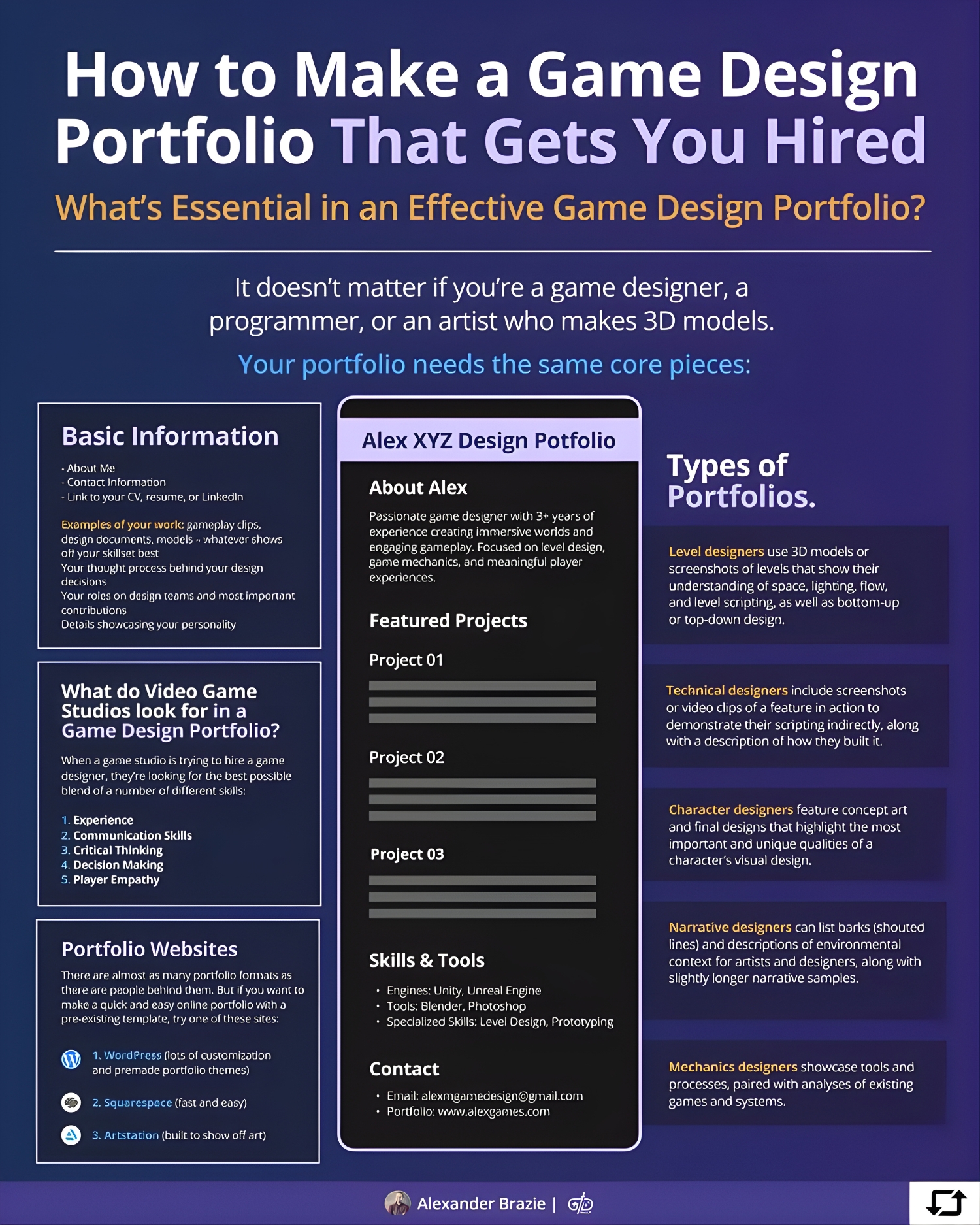
This post was inspired by the work of Alexander Brazie at Game Design Skills in Califonia.
Passionate – Dedicated – Professional
latest news & insights
We connect real-world labor trends, human behavior, and practical tools so students, parents, and professionals can make smarter decisions about work.
Every post is built to turn confusion into clarity and “someday” ideas into next steps you can act on today.










Share this article
Follow us
A quick overview of the topics covered in this article.